How to Set Up a Proxy to Change IP: A Straightforward Guide!
There's no need to feel hindered by online privacy issues or regional content barriers. "How to set up a proxy to change IP" is the solution you've been searching for. This blog will equip you with the necessary tools and knowledge to navigate the internet freely, securely, and anonymously.
How to Set Up a Proxy to Change IP
Using a proxy to change your IP address can significantly enhance your online privacy, allowing you to bypass regional content restrictions and maintain a degree of anonymity on the internet. Here are step-by-step instructions to help you set up a proxy and change your IP address.
On Computer
Setting up a proxy on your computer's settings will change the IP address of your entire computer, similar to using a VPN.
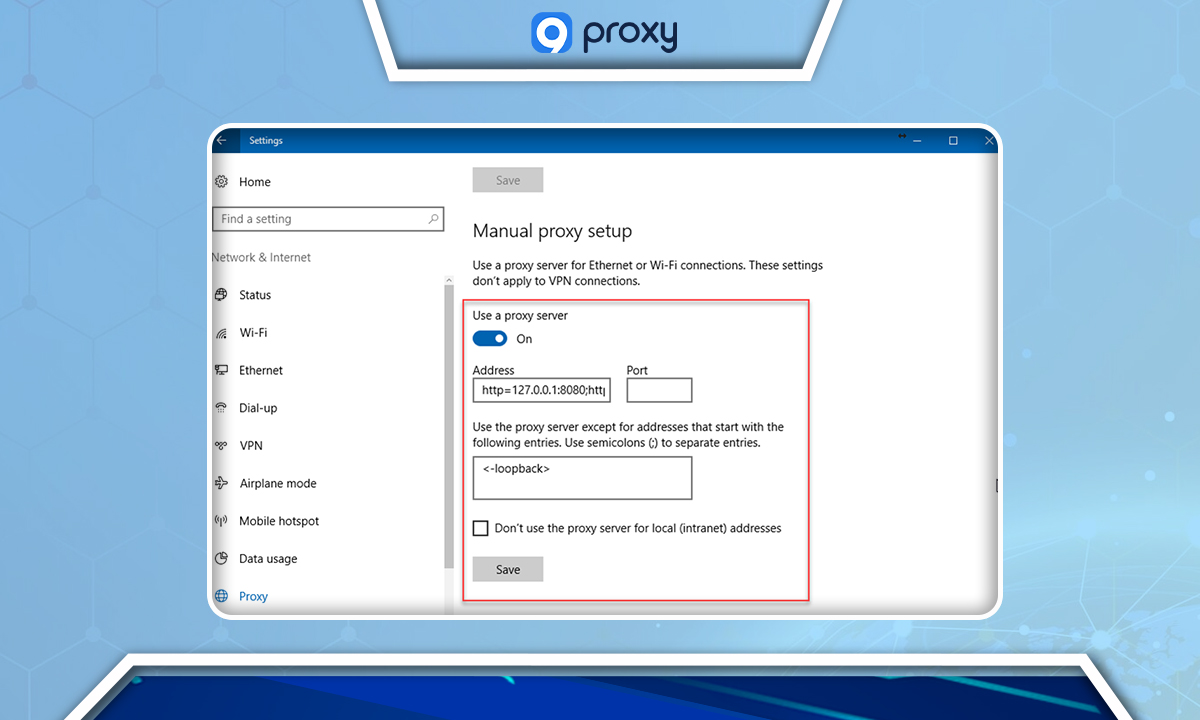
- Open the computer's settings section and select "Network & Internet."
- Click on "Proxy."
- In the "Manual proxy setup" section, turn on the "Use a proxy server" button.
- Fill in the corresponding Host and Port information.
- If your proxy requires a username and password, a window will prompt you to enter these details when accessing the web.
- Click "OK" to save your changes.
On Browser
Chrome:
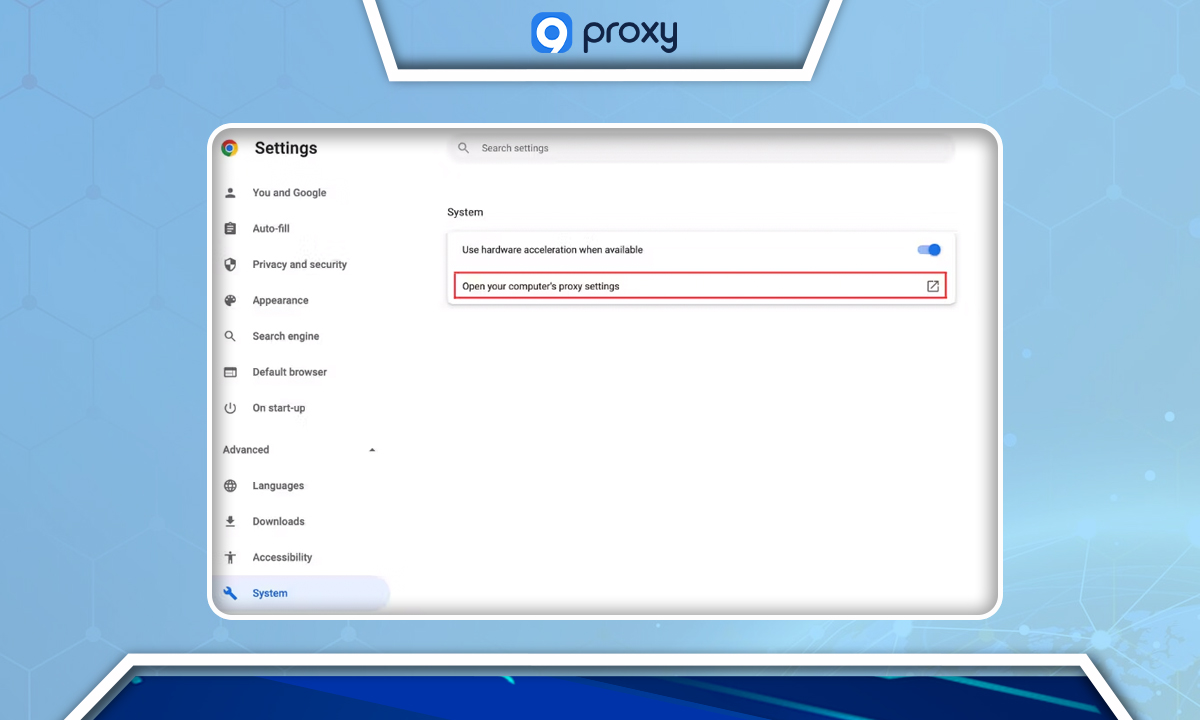
- Click on the 3-dot symbol at the top right, select "Settings," then "System."
- Click on "Open your computer's proxy settings."
- The "Network & Internet" window in your computer's settings will appear. Follow the steps in the "On Computer" section above.
Mozilla Firefox:
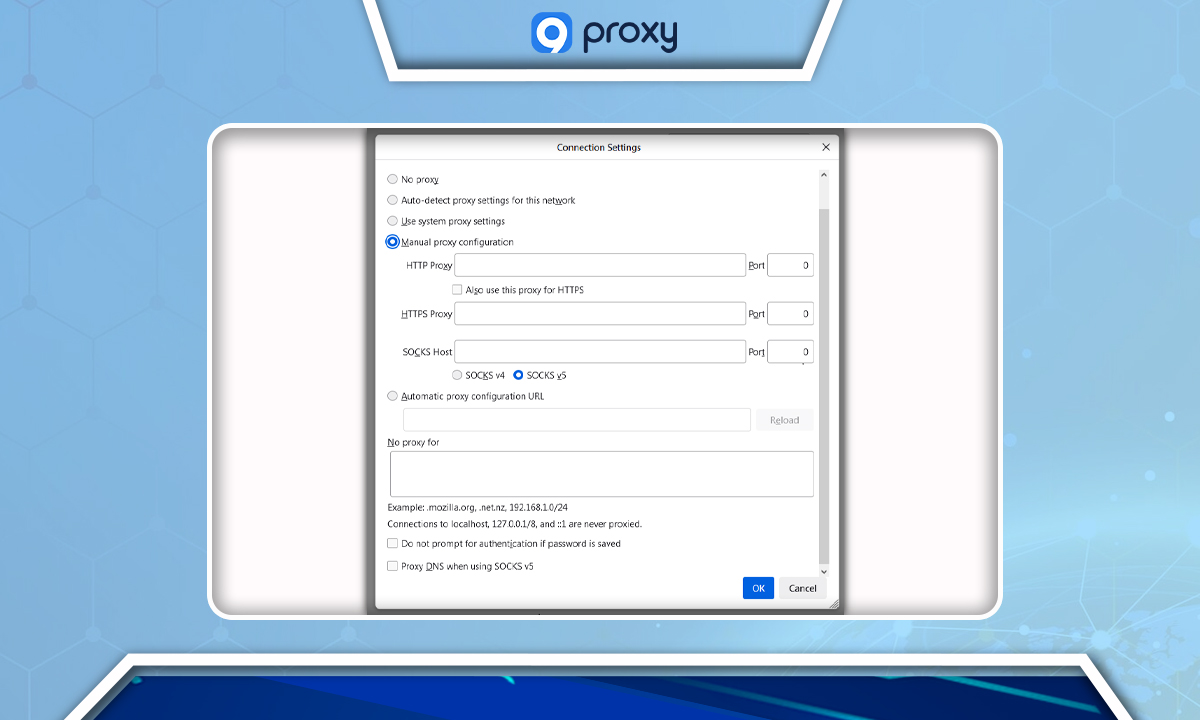
- Click on the 3-line symbol at the top right and select "Settings."
- Scroll down to "Network Settings" and click on the "Settings" button.
- In the "Connection Settings" window, select "Manual proxy configuration."
- Fill in the corresponding host and port information.
- If your proxy requires a username and password, a window will prompt you to enter these details when accessing the web.
- Click "OK" to save your changes.
Safari:
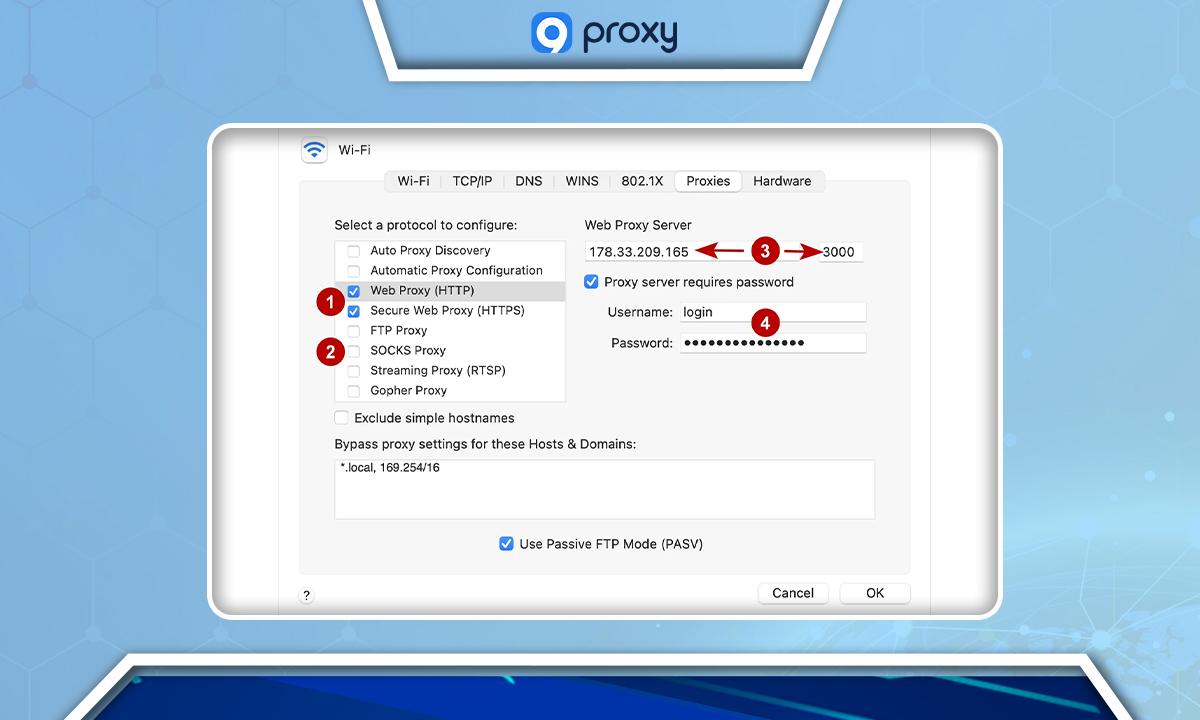
- Open Safari, click on "Preferences," and select "Advanced."
- In the "Proxies" section, click on "Change Settings."
- Open "Web Proxy" and "Secure Web Proxy" and enter the host and port information.
- If your proxy requires a username and password, enter these details in this section.
- Click "OK" to save your changes.
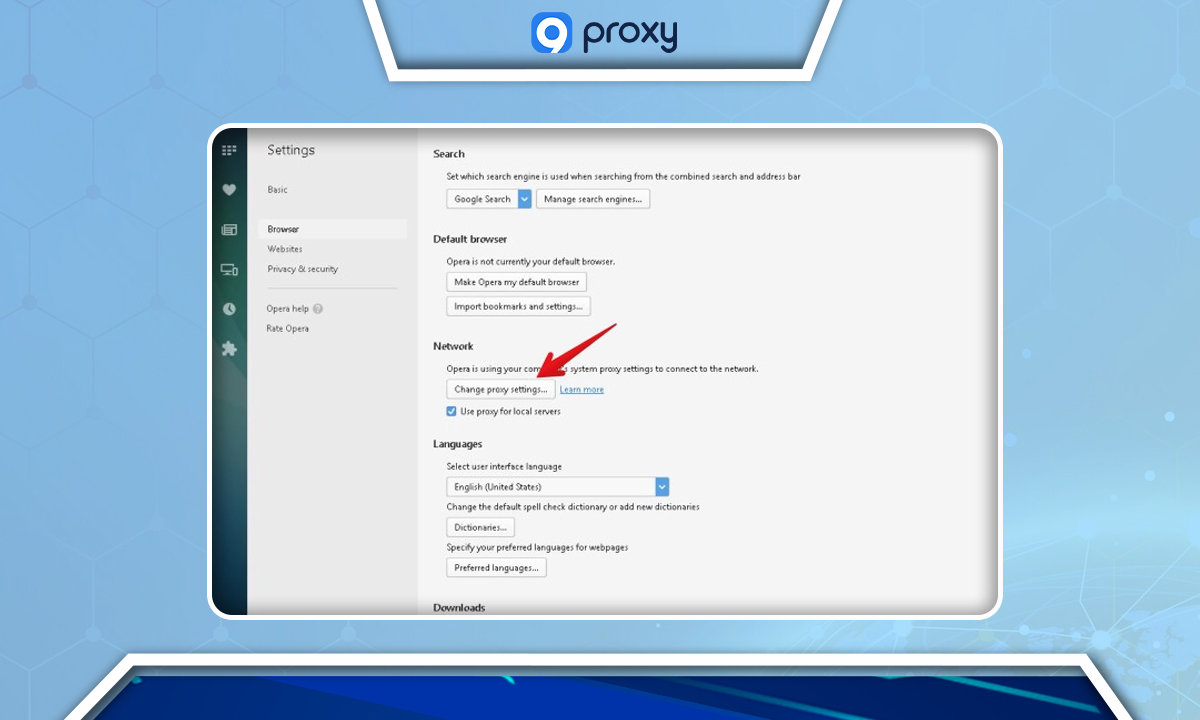
Opera:
- Click on "Settings," then "Advanced."
- Scroll down to "System" and click on "Open your computer's proxy settings."
- The "Network & Internet" window in your computer's settings will appear. Follow the steps in the "On Computer" section above.
Antidetect Browser: The antidetect browser allows you to easily add a proxy. You can add a proxy when creating a new profile or replace a proxy for an existing profile. The interface and steps to add a proxy may vary depending on the type of antidetect browser.
On Mobile App
You can change the IP address for phone apps by downloading the following applications:
- For Android: Sockdroid, Drony, ...
- For iOS: Shadowrocket, Potatso, …
Why Change Your IP Address?
Altering your IP address is a strategic measure that enhances protection against cyber threats, including hackers and surveillance activities. By concealing your identity and geographic location, you effectively shield your online persona, resulting in substantial privacy and security benefits. Additionally, this practice offers several other advantages, including:
- Privacy and Anonymity: Protecting one's identity online is crucial, especially when browsing sensitive information or aiming to remain anonymous.
- Security Measures: If a device has been compromised or is at risk of IP-targeted attacks, changing the IP address can provide an additional layer of security.
- Avoiding IP Bans: Changing the IP address can regain access to platforms or websites from which the original IP address was banned due to certain activities.
- Accessing Geographically Restricted Content: Some internet content or services are region-specific. By changing the IP address to one from the desired region, users can bypass these geographical restrictions.
- Preventing Tracking: Advertisers and websites often track user activities based on IP addresses. Regularly changing the IP address can prevent or limit this type of tracking.
- Network Management: In large-scale network setups, such as enterprises, IP addresses might need to be changed for better organization, load balancing, or to accommodate new network strategies.
- ISP or Hosting Changes: Switching Internet Service Providers or hosting services might result in being assigned a new IP address.
- Hardware Changes: Purchasing a new router or modem, or simply resetting them, can sometimes result in a changed IP address.
- Avoiding Digital Blacklists: If an IP address is associated with malicious activities and ends up on a blacklist, changing the IP address can help avoid those blacklists.
- Legal and Compliance Reasons: In certain jurisdictions or per specific industry standards, changing IP addresses might be a requirement to ensure data protection and privacy.
Types of IP Addresses
Understanding the different types of IP addresses and their unique functions can aid in making informed cybersecurity choices for your network.
Public IP
A public IP address is assigned to a network router by an Internet Service Provider (ISP). This address acts as the point of contact between a network and the public internet, allowing websites to identify and connect to the network. A public IP address can be traced back to the ISP, which uses it to monitor the user's location and online activities. Websites also utilize public IP addresses for web tracking purposes. A simple Google query for "What is my IP address?" will reveal the current IP address of a device. Note that there may be both IPv6 and IPv4 addresses listed, with IPv6 addresses being more common in modern internet usage.
Private IP
A private IP address is assigned to a device by a network router. This address enables devices within a network to communicate with each other without connecting directly to the public internet. A private IP address acts as a set of house keys, safeguarding devices from potential intruders.
Dynamic IP
A dynamic IP address is temporary and designed for short-term use. Due to the limited number of available IP addresses, dynamic addresses are a means of recycling IP addresses. After a specified period, an ISP will reclaim a dynamic address and assign a new one to the network from a pool of available options. Dynamic addresses are common for consumer equipment. It can be beneficial to understand how to change a dynamic IP address as an additional security measure.
Static IP
A static IP address remains fixed and does not change over time. If an ISP assigns a static IP address, it will typically remain the same until the device ceases to function or there is a change in network architecture. Static IP addresses are ideal for businesses or organizations that operate servers.
FAQ
How do I know if my proxy is working?
To test if your proxy server is working, compare your IP address before and after connecting to the proxy by using a website like "whatismyip.com". If the IP address is different, your proxy is active.
Can I use multiple proxies simultaneously?
Yes, this technique is referred to as proxy chaining. It involves directing your internet traffic through various proxy servers to further conceal your IP address and enhance online anonymity. However, keep in mind that proxy chaining can significantly slow down your internet connection.
Do all proxies support both HTTP and HTTPS traffic?
Not all proxies support both HTTP and HTTPS traffic. It is essential to check the specifications of the proxy server to ensure it meets your needs. For secure and encrypted browsing, make sure the proxy supports HTTPS.
Can proxies protect me from hackers?
A proxy server can provide a certain level of protection by concealing your original IP address, making direct attacks on your device more challenging for hackers. However, a proxy is not a comprehensive security solution. Implementing firewalls, anti-malware software, and practicing secure browsing habits are also crucial components of a robust cybersecurity strategy.
Conclusion
In conclusion, mastering how to set up a proxy to change your IP is a critical step in bolstering your digital privacy, circumventing geographically-based limitations, and preserving anonymity online. Given the array of IP addresses and proxy configurations at one's disposal, selecting an appropriate proxy setup is imperative for your cybersecurity requirements. It is important to recognize that while proxies provide a degree of security, they should be integrated into a broader, more robust security framework. For comprehensive tutorials and expert insights on proxy services, we invite you to consult further with 9Proxy, your dependable resource for advanced online security and privacy strategies.
Nhận bản tin về mọi thứ liên quan đến proxy