ixBrowser: How to Set Up Proxies for Enhanced Privacy and Account Management
Are you struggling to maintain privacy while managing multiple online accounts? Do you find it challenging to keep your digital identity secure across various platforms? If so, ixBrowser might be the solution you're looking for. In this blog, we'll walk you through how to set up proxies with ixBrowser to enhance your anonymity and streamline account management. Whether you're a professional managing multiple profiles or just looking to protect your data, this guide will help you navigate the process seamlessly. Keep reading to discover how ixBrowser can boost your online security and productivity.
- ixBrowser offers a powerful solution for anyone looking to enhance online privacy and streamline multi-account management. With its advanced proxy setup and customizable digital fingerprints, it’s the ideal tool for those seeking anonymity in the digital world. In this blog, we'll guide you through setting up proxies on ixBrowser to boost security and simplify account handling. Whether you’re a business professional or just someone looking to protect your online identity, you’ll find this guide invaluable.
- Maintaining privacy while managing multiple accounts online is no easy feat, but ixBrowser makes it simpler than ever. This innovative browser helps you manage profiles with ease and keep your digital footprint secure. In this blog, we’ll show you how to set up proxies in ixBrowser for optimal anonymity and seamless account management. Perfect for anyone wanting to take control of their privacy, this guide will ensure your online activity stays secure.
- Privacy and security are top priorities in today’s online world, and ixBrowser is here to make sure your data stays safe while managing multiple accounts. With features like customizable digital fingerprints and easy proxy setups, ixBrowser provides the tools you need to protect your online identity. This blog will walk you through setting up proxies with ixBrowser to enhance your security and simplify your workflow, giving you peace of mind as you navigate the web.
- When it comes to managing multiple online accounts securely, ixBrowser is a game-changer. With its robust privacy features and customizable proxy options, it’s designed to meet the needs of professionals and everyday users alike. This blog will guide you through setting up proxies with ixBrowser to maximize your online privacy and streamline your account management. Read on to learn how ixBrowser can improve both your security and productivity.
What Is IX Browser?
IX Browser is an anti-detect browser designed to help users maintain their privacy and anonymity online. It works by creating a fake digital fingerprint, which is attached to your browser's configuration file. This "fake fingerprint" is what websites will track, instead of your real one, making it much harder for anyone to trace your activities. One of the key features of IX Browser is its ability to manage multiple accounts and profiles seamlessly. Users can control all their accounts from a single, unified interface, making it a powerful tool for those who need to juggle several online identities.
Features Of The Ixbrowser
One of the standout features of ixBrowser is that its core functionality is available for free indefinitely. The free subscription allows users to create up to 10 profiles per day, with a limit of 100 profile launches each day. Unlike other anti-detect browsers, ixBrowser does not restrict the number of team members that can be added, making it a great tool for collaborative projects. In addition to these features, ixBrowser offers several advanced functionalities, which we will explore in more detail below.
Multi-Account Management
Managing multiple accounts in ixBrowser is made easy with its user-friendly features. Users can launch multiple profiles simultaneously and synchronize them to increase productivity. A specialized menu becomes available when starting multiple sessions, enabling users to edit profile groups, generate random digital fingerprints, and synchronize bookmarks. To simplify management, each profile is displayed with a unique indicator on the taskbar.
Organizing profiles into tags and groups is another essential feature, allowing for better distribution based on specific projects or tasks. This organizational structure improves efficiency and simplifies the management of multiple accounts.
Furthermore, ixBrowser includes an API that automates several tasks such as creating, managing, and switching between profiles. This is especially helpful for users who need to scale operations or adapt quickly, such as when testing marketing strategies or performing web scraping.
Team Collaboration Tools
ixBrowser also excels in team collaboration, offering flexible management features. Administrators can easily invite new team members by generating a unique code. Once the user enters this code, they can be added to the team workspace. Afterward, the administrator can assign specific roles and permissions, ensuring that team members can access only the necessary functions.
Another great feature is the ability to share profiles and proxy server details with team members. While cookies and other profile data transfer seamlessly, it’s worth noting that extensions and bookmarks are not included in this sharing process.
Secure Fingerprint
ixBrowser provides a set of digital fingerprint parameters that can be adjusted to protect user profiles from being blocked by targeted websites. Users can manually configure many of these parameters, or add noise to critical technologies that might reveal the real user data. Here are some basic and advanced options for modification:
Basic Parameters:
- User Agent: Controls information about the browser and device.
- System Language, Time Zone, Geographic Location: Allows customization of location and settings to mask real user data.
- Screen Resolution, Fonts: Modifies how the system identifies the user’s display settings.
- CPU and RAM Size: Changes hardware identifiers to further obscure real data.
Advanced Options:
- Canvas Masking: Adds noise to reduce the likelihood of traceability through device graphics characteristics.
- WebRTC: Adds noise to conceal the real IP address and prevent leaks via multimedia communication.
- WebGL: Alters WebGL data to obscure details of the graphics processor, increasing anonymity.
- Client Rects: Adding noise here makes it harder to track by distorting the interface elements' size and position.
Additionally, ixBrowser includes protection against port scanning, providing another layer of security for users looking to maintain complete anonymity.
Benefits Of Ixbrowser
ixBrowser is an invaluable tool for both everyday users and professionals across various online fields. Here’s why it stands out:
Free to Use
One of the major advantages of ixBrowser is that it’s completely free to download and use. There are no hidden fees, making it accessible to everyone looking for a way to enhance their privacy and online anonymity.
Customizable Digital Fingerprints
ixBrowser allows users to fully customize their digital fingerprint parameters. You can create profiles with unique characteristics by modifying key elements such as UserAgent, time zone, language, WebRTC settings, and other critical parameters. While you have the option to manually adjust these settings, ixBrowser also has an automatic feature that generates a unique digital fingerprint for you, streamlining the process.
Extension Support
ixBrowser supports Chrome extensions, so you can easily download and install any extension from the Chrome Web Store. This gives you the flexibility to extend the browser’s functionality based on your specific needs, whether for productivity, security, or customization.
Team Collaboration
For those working in teams, ixBrowser offers great features for role management and collaboration. Multiple users can manage a single account, with the ability to assign different roles, making it ideal for group projects and joint account management.
Profile Transfer
Another handy feature is the ability to share profiles with others while keeping the original digital fingerprints intact. This means you can easily transfer your profiles without compromising your privacy, ensuring smooth collaboration across multiple accounts.
To get started, simply head over to ixbrowser.com to download the browser. The website also offers video tutorials to guide users through the features of ixBrowser, organized by category for ease of access.
Increased Privacy with Proxy Servers
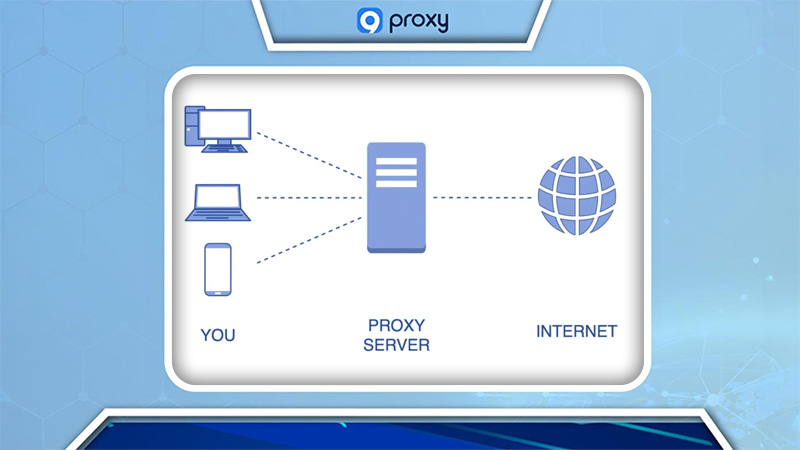
While ixBrowser offers excellent tools for anonymity, combining it with a proxy server significantly enhances your privacy. A proxy server acts as an intermediary between you and the internet, masking your IP address and geolocation. This setup not only adds another layer of security but also allows you to create the illusion of activity from another user. To further boost your privacy, you can rent anonymous private proxies through Proxys.io, which offers a wide range of proxies from 88 countries and includes mobile, residential, server, IPv4, and IPv6 options.
How To Setup A Proxy On IX Browser
Step 1: Start With 9proxy
- Open the 9Proxy app and go to the Proxy List section.
- Browse through the available proxies and choose one that suits your needs. If you want more options, click Refresh List to load additional proxies.
Setting Up Geolocation Targeting
You can configure your proxy to target specific geolocations, such as countries, cities, states, ZIP codes, or ISPs. This feature ensures optimal performance and accuracy based on your use case.
Configuring Proxy Forwarding
To use a proxy, you need to forward it to a designated port. Make sure you have a valid port range configured for proper proxy connection management.
- Right-click on your selected proxy or click the icon and choose one of the following options:
- Forward to Port – Assigns a proxy to a single port.
- Forward to Multiple Ports – Assigns multiple proxies to multiple ports.
- Forward to Free Ports – Automatically assigns proxies to unused ports in your range.
- Forward to All Ports – Assigns proxies to all ports, including used and free ports.
- Forward to Configured Ports – Assigns proxies to pre-configured ports only (you must configure these ports first).
- After successfully forwarding proxies, navigate to the Forwarding List section on the left side of the app to see details about the forwarded proxies, their assigned ports, and their current status.
- Copy the IP information and continue to the next step.
Step 2: Setup 9proxy On Ixbrowser
- Navigate to the profiles tab in IX Browser and click on + Create profile to start creating a new profile.
- In the new window, select the platform you want to use, give your profile a name, and assign it to a group if desired. You can also set a username and password for added security, upload cookies, and add notes for reference.
- Move to the next tab to add a proxy server. Paste the IP you forwarded in the 9Proxy app and make sure to verify its functionality.
- In the Fingerprint Configuration tab, you can choose to randomly generate a User Agent and select the browser kernel version. Adjust the language settings, time zone, and geolocation to match the proxy IP for consistency.
- Apply noise to specific parameters to increase the confidentiality of your connection and prevent tracking by target resources.
- Scroll to the bottom and enable the "Do not track" feature. Optionally, set up port scanning protection for additional security.
- In the final tab, you can activate extra features such as cloud backup storage and extension synchronization. You can also allow multiple employees to access the profile simultaneously. Once everything is set, click Create.
- The newly created profile will now appear in the Profile List tab. Click on the "Open" button to use the profile.
ixBrowser offers extensive features for team collaboration, allowing role customization for team members, seamless sharing of information, and unlimited access for team members. With its free access to basic functions, ixBrowser is an appealing choice for users who want to protect their data or bypass restrictions efficiently.

Conclusion
In conclusion, ixBrowser offers a comprehensive solution for enhancing online privacy and managing multiple accounts effortlessly. By setting up proxies, you can secure your digital identity while streamlining your workflow, making ixBrowser an essential tool for both personal and professional use. Don’t forget to explore more insightful blogs from 9Proxy to discover additional tips and tools to safeguard your online presence. Stay tuned and keep browsing safely!
Get Newsletters About Everything Proxy-Related